
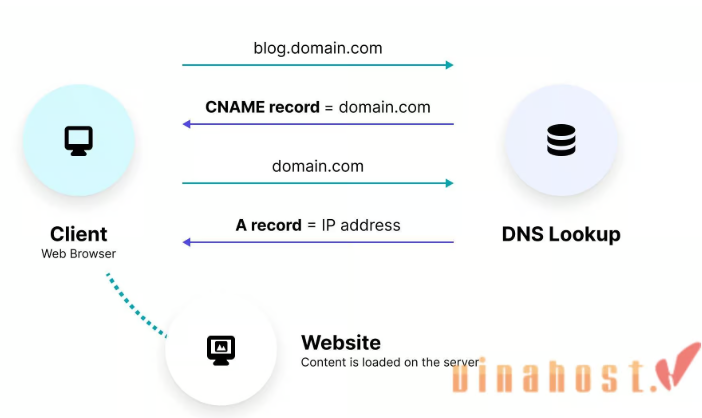
A CNAME (Canonical Name) record is a type of DNS record used to map an alias name to the true (canonical) domain name of a resource. It allows multiple domain names to point to the same IP address without duplicating records, simplifying DNS management.
Key Features of a CNAME Record
- Alias Name:
- The name of the domain or subdomain you want to redirect (e.g.,
www.example.com).
- The name of the domain or subdomain you want to redirect (e.g.,
- Canonical Name (Target):
- The actual, fully-qualified domain name (FQDN) to which the alias points (e.g.,
example.com).
- The actual, fully-qualified domain name (FQDN) to which the alias points (e.g.,
- TTL (Time to Live):
- The duration for which the record should be cached by DNS resolvers.
How a CNAME Record Works
- DNS Query Resolution:
-
- When a client queries for an alias (e.g.,
www.example.com), the DNS server checks for a CNAME record. - If a CNAME exists, the server retrieves the canonical name (e.g.,
example.com) and resolves it to an IP address using its A or AAAA record. - The client is then directed to the correct IP address.
- When a client queries for an alias (e.g.,
- Example:
-
- A CNAME record:
www.example.com. 3600 IN CNAME example.com. - When someone accesses
www.example.com, the DNS resolves it toexample.com, and the process continues until the final IP address is resolved.
- A CNAME record:
Key Use Cases for CNAME Records
- Subdomain Redirection:
-
- Redirecting
wwwto the root domain:www.example.com. IN CNAME example.com.
- Redirecting
- Pointing to External Services:
- Mapping subdomains to third-party services like:
blog.example.com->blog.hostingprovider.comcdn.example.com->cdn.serviceprovider.com
- Mapping subdomains to third-party services like:
- Load Balancers and CDN:
- Ensures aliases can dynamically update to different target IPs as determined by the load balancer or CDN.
- Simplifying DNS Management:
-
- Centralizes domain configuration. If the target changes (e.g.,
example.com’s IP), all aliases automatically reflect the update.
- Centralizes domain configuration. If the target changes (e.g.,
CNAME vs. A Record
| Feature | CNAME Record | A Record |
|---|---|---|
| Points To | Another domain name | An IP address |
| Alias Usage | Used for aliases or subdomains | Directly maps a domain/subdomain to an IP |
| Chaining | Requires resolving the target domain further | Does not involve additional lookups |
For example:
- CNAME:
www.example.com -> example.com -> 192.0.2.1 - A Record:
www.example.com -> 192.0.2.1
Rules and Limitations
- Root Domain Restrictions:
-
- CNAME records cannot be used for the root domain (e.g.,
example.com) because the root domain must also handle other DNS records like MX and NS.
- CNAME records cannot be used for the root domain (e.g.,
- Single Use per Record:
- A domain cannot have both a CNAME and other records (e.g., A, MX) simultaneously.
- Increased Lookup Time:
-
- Since a CNAME involves an additional query to resolve the canonical name, it may slightly increase DNS resolution time.
Best Practices
- Use for Aliases Only:
-
- Use CNAMEs for subdomains or non-critical services, not the root domain.
- Avoid Chaining:
- Do not point one CNAME to another CNAME to prevent performance issues and complexities.
- Combine with TTL:
-
- Set an appropriate TTL value to control how long resolvers cache the record, balancing performance and flexibility.
Example for a Third-Party Service
If your website uses an external blogging platform, you might configure:
blog.example.com. 3600 IN CNAME blogs.platform.com.
When someone visits blog.example.com:
- DNS resolves it to
blogs.platform.com. - The resolver then finds the A record for
blogs.platform.com, returning an IP address.
By using CNAME records strategically, you can streamline DNS management, provide flexibility for future updates, and integrate with external services efficiently.


