
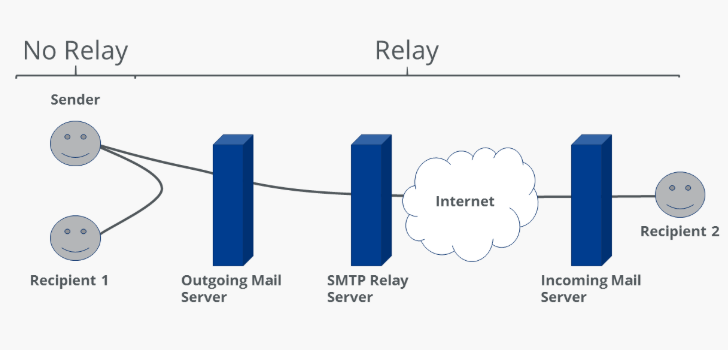
A relay email refers to the process of forwarding or passing email messages from one mail server to another, typically through an intermediate server known as a mail relay. This is commonly used in email delivery systems to ensure messages are successfully routed to their intended recipients, even across different domains or servers.
How Relay Email Works
- Sender’s Email Server:
-
- A user or application sends an email, which is first processed by their outgoing mail server (SMTP server).
- Mail Relay Server:
- The sender’s server passes the email to a relay server, which acts as an intermediary for delivering the email to its final destination.
- Recipient’s Email Server:
-
- The relay server forwards the email to the recipient’s server, which delivers it to the inbox.
Use Cases for Email Relay
- Internal Email Systems:
-
- Large organizations route emails through internal relay servers for better control over email traffic.
- Third-Party Email Services:
- Businesses use third-party email relay providers (e.g., SendGrid, Postfix, Amazon SES) to handle high volumes of outbound emails, ensuring better deliverability.
- Cross-Domain Email Delivery:
-
- Relay servers help ensure emails sent from one domain to another comply with authentication protocols (SPF, DKIM, DMARC).
Benefits of Using Mail Relay in Business
1. Improved Email Deliverability
- Mail relays optimize email delivery by adhering to recipient server requirements, avoiding spam filters, and ensuring proper DNS configurations.
2. Scalability
- Businesses that send bulk emails (e.g., marketing campaigns, transactional emails) can handle higher volumes without overwhelming their own servers.
3. Enhanced Security
- Mail relays can apply authentication mechanisms such as SPF, DKIM, and DMARC, protecting against spoofing and phishing attacks.
- Some relay services provide encryption (TLS) to secure email content during transit.
4. Centralized Control
- Relays allow businesses to monitor, filter, and log all email traffic from a single point, enabling better compliance with regulations and policies.
5. Load Balancing
- By offloading email traffic to a relay server, businesses reduce the load on their primary mail server, ensuring better performance for internal communication.
6. Backup and Redundancy
- Relay servers can act as backups, holding emails temporarily if the recipient’s server is down and retrying delivery later.
How to Use a Mail Relay
1. Setting Up a Mail Relay
- Configure your mail server (e.g., Postfix, Exchange) to forward outbound emails to a relay server.
- Specify the relay server’s hostname or IP address and authentication credentials in the mail server settings.
2. Authentication
- Use proper authentication mechanisms, such as:
- SMTP Authentication (SMTP AUTH): Authenticate with the relay server using a username and password.
- IP Whitelisting: Configure the relay server to accept emails only from specific IP addresses.
3. DNS Configuration
- Set up proper DNS records (SPF, DKIM, DMARC) to authorize the relay server for sending emails on behalf of your domain.
4. Testing and Monitoring
- Send test emails to verify proper delivery and authentication.
- Use monitoring tools to track email delivery rates, errors, and potential issues.
Examples of Email Relay Providers
- SendGrid: Popular for transactional and marketing emails.
- Amazon SES (Simple Email Service): Scalable email relay for businesses.
- Postfix: Open-source mail transfer agent for setting up custom relay servers.
- Microsoft Exchange Online Protection: Provides email relay with added spam and malware protection.
When to Use Mail Relays in Business
- High Volume Email Sending:
-
- For sending transactional emails (e.g., password resets, order confirmations) or marketing campaigns.
- Compliance and Security:
- When strict regulations (e.g., GDPR, HIPAA) require email monitoring, encryption, or archiving.
- Cross-Organizational Communication:
- For businesses that manage multiple domains or communicate with external organizations.
- Disaster Recovery:
- To ensure emails are not lost during server outages, with the relay acting as a fallback.
Mail relay servers are invaluable for businesses seeking to optimize email delivery, enhance security, and manage email traffic efficiently. By choosing the right relay service and properly configuring it, you can ensure reliable and secure communication across your organization.
🔔 Subscribe for more contents on YouTube🔔
https://www.youtube.com/@TechwithVichka?sub_confirmation=1
CONNECT WITH US!
========================================
Facebook: https://www.facebook.com/TechwithVichka
Telegram Channel: https://t.me/TechwithVichka
========================================


