
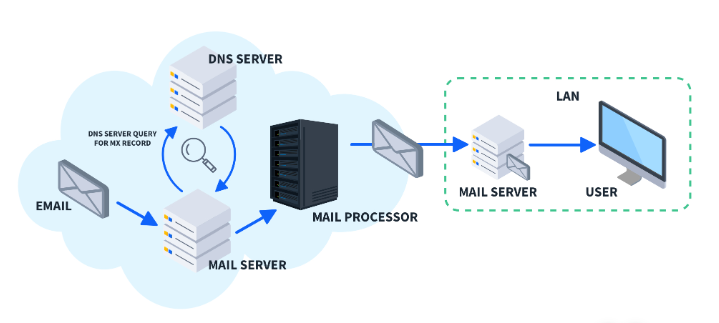
An MX (Mail Exchange) record is a type of DNS record used to direct email messages to the correct mail servers for a domain. MX records are essential for email delivery, ensuring that incoming emails are routed to the proper destination.
Key Components of an MX Record
An MX record includes the following fields:
- Domain Name: The domain for which the email server is responsible (e.g.,
example.com). - Priority (Preference): A numeric value indicating the priority of the mail server. Lower numbers indicate higher priority.
- Mail Server (Target): The hostname of the mail server that will process the emails (e.g.,
mail.example.com). - TTL (Time to Live): The duration (in seconds) the record should be cached by DNS resolvers (e.g.,
3600seconds).
Example of an MX Record
For a domain example.com, the DNS might have the following MX records:
example.com. 3600 IN MX 10 mail1.example.com.
example.com. 3600 IN MX 20 mail2.example.com.
Explanation:
- Priority:
10formail1.example.com: This is the primary mail server and will be tried first.20formail2.example.com: This is a backup server, used if the primary is unavailable.
- Mail Server: The actual servers that will handle the email traffic.
- TTL: The time (3600 seconds) the record is valid in the DNS cache.
How MX Records Work
- Email Delivery Process:
-
- When an email is sent to
user@example.com, the sender’s email server queries the DNS for the MX records ofexample.com. - The DNS returns a list of MX records, sorted by priority.
- The sender’s server attempts to deliver the email to the mail server with the highest priority (lowest number).
- If that server is unavailable, the next highest priority server is tried, and so on.
- When an email is sent to
- Fallback Mechanism:
-
- MX records allow failover and redundancy, ensuring emails are delivered even if the primary mail server is down.
Use Cases for MX Records
- Hosting Email Services:
-
- If a company uses Gmail or Microsoft 365 for email, they need to configure MX records provided by the email service.
- Failover Configuration:
- Backup mail servers can be set up with higher priority numbers to handle emails during downtime.
- Hybrid Email Hosting:
-
- Some organizations host part of their email on-premises and part in the cloud, requiring multiple MX records for proper routing.
Best Practices for Configuring MX Records
- Correct Prioritization:
-
- Assign a lower priority (higher number) to backup servers and ensure they’re functional.
- Valid Hostnames:
- Ensure the mail server hostname resolves to an IP address.
- Combine with Other Records:
- Use SPF, DKIM, and DMARC TXT records for email authentication and to prevent spoofing or phishing.
- Monitor and Test:
-
- Test MX record configurations using tools like
nslookup,dig, or online DNS checkers.
- Test MX record configurations using tools like
Example for Google Workspace Email Hosting
To configure Google Workspace for example.com, the following MX records are typically added:
example.com. 3600 IN MX 1 aspmx.l.google.com.
example.com. 3600 IN MX 5 alt1.aspmx.l.google.com.
example.com. 3600 IN MX 5 alt2.aspmx.l.google.com.
example.com. 3600 IN MX 10 alt3.aspmx.l.google.com.
example.com. 3600 IN MX 10 alt4.aspmx.l.google.com.
This configuration:
- Directs emails to Google’s mail servers.
- Uses different priorities to handle redundancy and load balancing.
MX records are fundamental to email delivery and, when properly configured, ensure reliable and efficient routing of email traffic for any domain.


